
Paper Clutter: A Practical System for Managing Mail, Documents, and Records

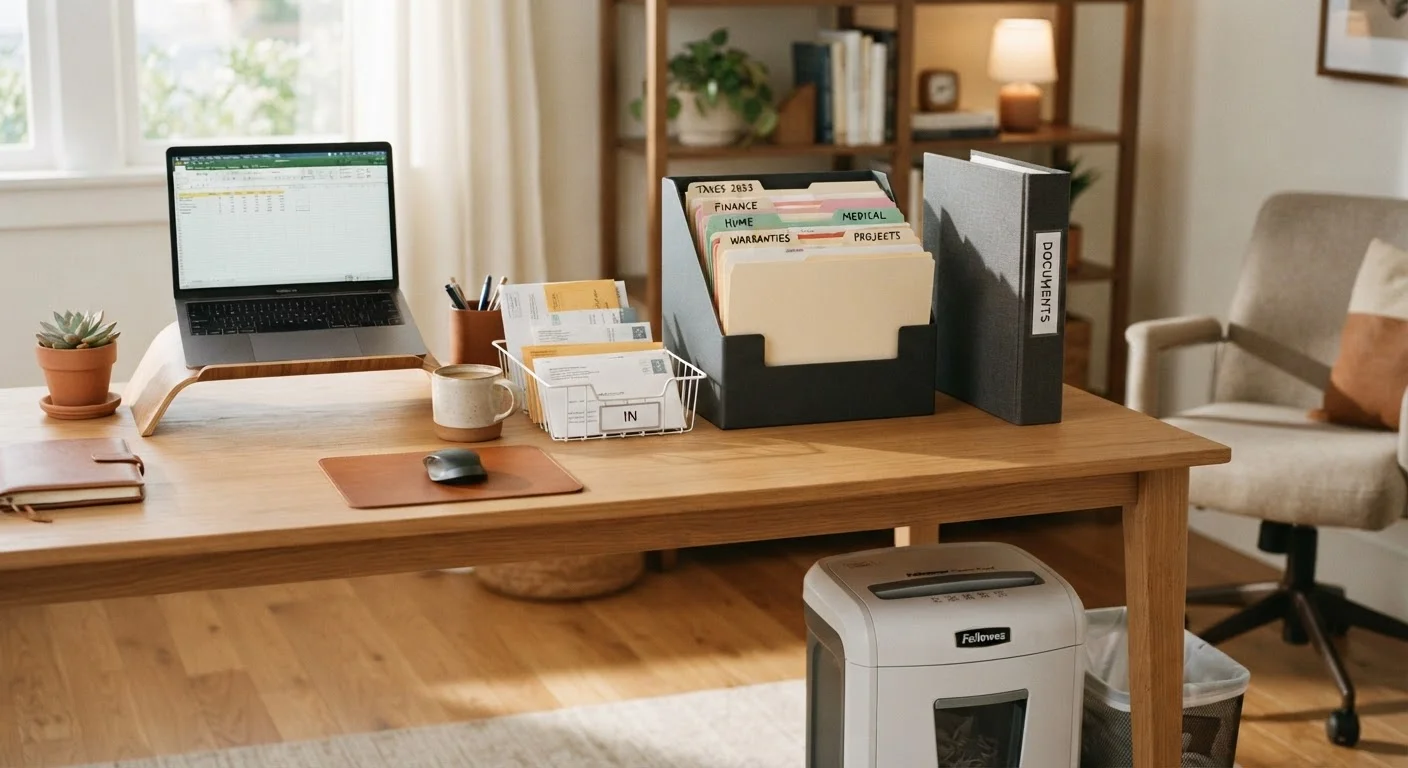
Photo: Online-Searches.net | Explore Insightful Blogs editorial
Key Takeaways
- Paper clutter builds up without a clear sorting routine — daily habits prevent backlogs.
- Most paper that enters your home can be discarded or handled immediately.
- A three-zone filing system covers everyday needs: action, archive, and shred.
- Digital scanning extends document life and reduces physical storage demands.
- Consistent weekly and annual reviews keep the system from breaking down over time.
Why Paper Clutter Is Uniquely Stubborn
Paper is different from other household clutter because it arrives uninvited, carries real consequences if discarded incorrectly, and compounds quickly. A few days of ignored mail can become an overwhelming pile within weeks. Unlike a pile of old clothes or unused gadgets, paper piles feel high-stakes — you can't always tell at a glance what's junk and what's important.
Most households receive a mix of mail that spans immediate needs (bills, notices) and near-worthless volume (promotional mailers, catalogs, credit card offers). Without a clear sorting habit, everything lands in a heap and the heap grows. If this pattern feels familiar, you're not alone — and it's not a personal failing. It's a systems problem, and systems problems have systems solutions.
If you're newer to home organization more broadly, our decluttering guide for beginners is a useful starting point before diving into paper-specific strategies. You might also be surprised which organization myths are holding you back — many people believe they need more storage when what they actually need is a better sorting habit.
Go Paperless at the Source
What You'll Need Before You Start
Before working through the steps, assemble the supplies that make the system functional. A paper management setup doesn't require an expensive filing cabinet or elaborate organizers — the basics are straightforward and widely available.
Inbox tray or mail basket
Provides a single designated landing spot for all incoming paper so nothing gets scattered.
Hanging file folders and a file box or cabinet
Used to create labeled categories for archived documents that need long-term storage.
Cross-cut or micro-cut shredder
Securely destroys documents containing personal or financial information before disposal.
Label maker or printed labels
Keeps file categories clearly marked so retrieval is fast and consistent.
Scanning app or flatbed scanner
Creates digital backups of important documents, reducing the volume of physical paper to store.
Accordion folder or desktop organizer
Holds active or pending documents that need attention in the near term.
Having these on hand before you start prevents you from stopping mid-process to track something down.
What you will need
Building the System: Step-by-Step
Follow these steps to move from chaos to a working system. The initial setup takes the most time; once it's built, daily maintenance is minimal.
Collect all paper into a single staging area
Gather every piece of paper in your home — countertops, drawers, bags, car, and any other hiding spots — and place it all in one location, such as a cleared kitchen table. This consolidation step prevents you from building a partial system while paper remains scattered elsewhere. Don't sort yet; just collect.
Sort into four broad categories
Working through the pile, sort every piece of paper into one of four groups:
- Act on it: Requires a response or action — bills to pay, forms to fill out, appointments to schedule.
- File it: Important to keep but needs no immediate action — insurance documents, warranties, tax records.
- Read it: Magazines, newsletters, or items you want to review before deciding.
- Toss or shred it: Junk mail, outdated catalogs, duplicates, expired coupons, and anything with personal data that must be shredded.
This sort reveals the true composition of your paper clutter and makes the next steps much faster.
Handle the "Act On It" pile immediately
Resolve as many action items as you can right now — pay a bill online, make a phone call, fill out a form. For anything that genuinely cannot be done today, place it in a designated action folder or desktop tray that you'll check at least weekly. The action zone should hold a small number of items at any given time; if it starts accumulating, you need a more consistent weekly processing habit.
Set up a simple archive filing system
Create labeled hanging file folders for the document categories that reflect your life. Common categories include:
- Tax returns and supporting documents
- Insurance policies (home, auto, health, life)
- Medical records and EOBs (Explanation of Benefits)
- Home records (mortgage, deed, warranties, renovation receipts)
- Vehicle records (title, registration, service history)
- Financial accounts and investment statements
- Legal documents (wills, trusts, contracts)
- Employment and pay stubs
Keep this file box or cabinet in an accessible but out-of-the-way spot — a closet shelf, under a desk, or in a home office cabinet works well. File new documents within these categories as they arrive.
Scan and back up critical documents
For irreplaceable documents — deeds, wills, Social Security cards, passports, insurance policies — create digital scans and store them securely. Options include an encrypted cloud storage service or an external hard drive kept in a fireproof location. Scanning apps on smartphones can produce high-quality PDFs of most standard documents. A digital backup means you can access these records even if physical copies are lost in a disaster.
Shred and recycle the discard pile
Work through the toss pile: recycle anything without personal information, and shred everything that contains your name, address, financial data, or identification numbers. If your shredder is small, this may take multiple sessions — that's fine. Some office supply stores and community events also offer periodic shredding services for large volumes.
[important_callout]
Build a daily and weekly maintenance routine
The system only works if paper is processed consistently. Establish two habits:
- Daily (2 minutes): Sort incoming mail at the door or mailbox. Immediately recycle junk mail, place bills and statements in the action tray, and file anything that belongs in the archive.
- Weekly (10–15 minutes): Clear the action tray, file anything that's accumulated, and review the read pile. Discard what you've read or decided against.
Once a year — tax time works well as a natural trigger — purge outdated files from your archive and shred anything past its recommended retention period.
Don't Discard Documents You May Need
Keeping the System Working Long-Term
A paper management system isn't a one-time project — it requires small, consistent inputs to stay functional. The most common reason these systems fail is that the initial sort gets done but no routine is established to handle new paper as it arrives. Within weeks, surfaces fill up again.
Think of your paper system the way you think of a kitchen — it works when there are clear homes for things and a consistent habit of putting them there. The long-term case for a tidy home applies here too: the effort you invest now pays dividends in reduced stress, faster document retrieval, and fewer missed deadlines.
Paper clutter rarely exists in isolation, either. If your kitchen counters are consistently overwhelmed, the same underlying habits are likely at work — our guide on why kitchen countertops fill back up explores those root causes in more depth. For a complete view of home organization from first sort to long-term maintenance, see our end-to-end organization resource.
The content provided on our blog site traverses numerous categories, offering readers valuable and practical information. Readers can use the editorial team’s research and data to gain more insights into their topics of interest. However, they are requested not to treat the articles as conclusive. The website team cannot be held responsible for differences in data or inaccuracies found across other platforms. Please also note that the site might also miss out on various schemes and offers available that the readers may find more beneficial than the ones we cover.